Original research · October 2026
We tested 200 case notes on our own redaction tool. Here's what slipped through.
 By Zehaan Khan · Updated October 16, 2026
The short version: we planted 1,491 personal details in 200 realistic, made up case notes and ran every one through Safe Paste, our free tool that hides client details before they go into ChatGPT. The first version hid 84.4%. The study showed us exactly where it failed, we fixed what could be fixed the same day, and version 1.1 hides 89.4% automatically and 95.3% when staff add the client's name. Three kinds of detail still get through, and no automatic tool catches them. Here's all of it, including the misses.
Most redaction tools tell you what they catch. Very few publish what they miss. If staff are going to trust a tool with case notes, they deserve both numbers.
How we tested it
We never test on real client information. Instead we built a test set of 200 made up case notes that look like the real thing: case notes, emails, referrals and texting style messages, written for Ontario, BC, the UK and the US.
Every note had personal details planted in it, and we recorded exactly where each one sat: 1,491 details in total across 44 kinds (1,451 direct identifiers like names and numbers, plus 40 descriptions that identify someone without a name). Names in every form we could think of (capitalized, lowercase, ALL CAPS, hyphenated, after a title, names that are also ordinary words like Grace and Hope, names in Arabic and Farsi script), phone numbers in seven formats, emails, SIN, Ontario and BC health card numbers, NHS and National Insurance numbers, SSNs, test credit cards, client IDs, five date formats, street addresses with and without units, and postcodes.
Everything in the set is fake on purpose: phone numbers in the 555-01xx range reserved for fiction, NHS numbers from the official test range, SINs starting with 0 and SSNs starting with 9, which are never issued to anyone, and emails at example.org.
Then we ran every note through the same detection code that runs in your browser when you use Safe Paste, and scored it strictly:
- A detail counts as caught only if all of it was hidden. Hiding half a phone number counts as a miss, because half a phone number still leaks.
- A note counts as clean only if every direct identifier in it was hidden.
- We tested two ways: with default settings, and with the client's name typed into "Always hide", which is what the tool tells staff to do.
What version 1.0 got wrong
The first run hid 84.4% of the direct identifiers and left only 32.5% of notes fully clean. One miss is enough to identify someone, so that second number is the one that matters.
The failures were specific:
- International phone numbers came out half hidden. In "+44 7700 900123", the "7700 900123" part looked like a health card number and won, so the "+44" leaked.
- Toronto style unit addresses, like "1203-55 Harbour Square", lost the unit number.
- Lowercase addresses, like "210 birchmount road", weren't recognized at all.
- Names in Arabic and Farsi script weren't flagged, which matters a lot for newcomer services.
- "Always hide" missed first names in lowercase notes. Typing "Amina Rahimi" hid "amina rahimi" but not "amina" on its own.
We fixed all five the same day. Every fix has its own automated test, and none of them added false alarms. A sentence like "she has 2 kids and will drive them to court" still comes through untouched.
Version 1.1: the results
Here are the same numbers as a table, including the extra step of typing the client's name into "Always hide":
| Type of detail | Tested | Version 1.0 | Version 1.1 | 1.1 + client name in "Always hide" |
|---|---|---|---|---|
| Names in Arabic, Farsi, Ge'ez script | 15 | 0% | 100% | 100% |
| Phone numbers | 148 | 89.2% | 100% | 100% |
| Full names | 157 | 100% | 100% | 100% |
| Dates of birth | 92 | 100% | 100% | 100% |
| SIN, health card, NHS, NI, SSN, IDs | 198 | 100% | 100% | 100% |
| First name used alone (after the full name) | 157 | 100% | 100% | 100% |
| Single names mid sentence | 84 | 100% | 100% | 100% |
| Names after son, daughter, husband... | 81 | 100% | 100% | 100% |
| Emails | 70 | 100% | 100% | 100% |
| Names after a title (Ms., Dr.) | 92 | 100% | 100% | 100% |
| ALL CAPS names | 24 | 100% | 100% | 100% |
| Postcodes and ZIP codes | 78 | 100% | 100% | 100% |
| Street addresses | 101 | 57.4% | 99% | 99% |
| Grace, Hope... starting a sentence | 38 | 2.6% | 2.6% | 2.6% |
| Single names starting a sentence | 30 | 0% | 0% | 0% |
| lowercase names (texting style) | 86 | 0% | 0% | 100% |
| Descriptions that identify someone | 40 | 0% | 0% | 0% |
| All direct identifiers (names, numbers, dates, places) | 1,451 | 84.4% | 89.4% | 95.3% |
| Notes with nothing left behind | 200 | 32.5% | 45% | 66% |
Phone numbers, ID and health numbers, dates of birth, emails, postcodes and capitalized names are now caught every time in this test set. Adding the client's name to "Always hide" takes lowercase names from 0% to 100% and the share of fully clean notes from 45% to 66%.
The three things no tool caught
This is the part that matters most for your team.
1. Single names at the start of a sentence (0 of 30). "Aoife from the youth program dropped off the forms." There's no reliable way for a pattern tool to know "Aoife" is a person and "Spoke" isn't, without also hiding half the sentences in a note.
2. Names that are also words, at the start of a sentence (1 of 38). "Grace called back." "Hope missed group again." Grace and Hope are names, and also words. A tool that hid them would also hide "Will", "May" and "Mark" every time they appear.
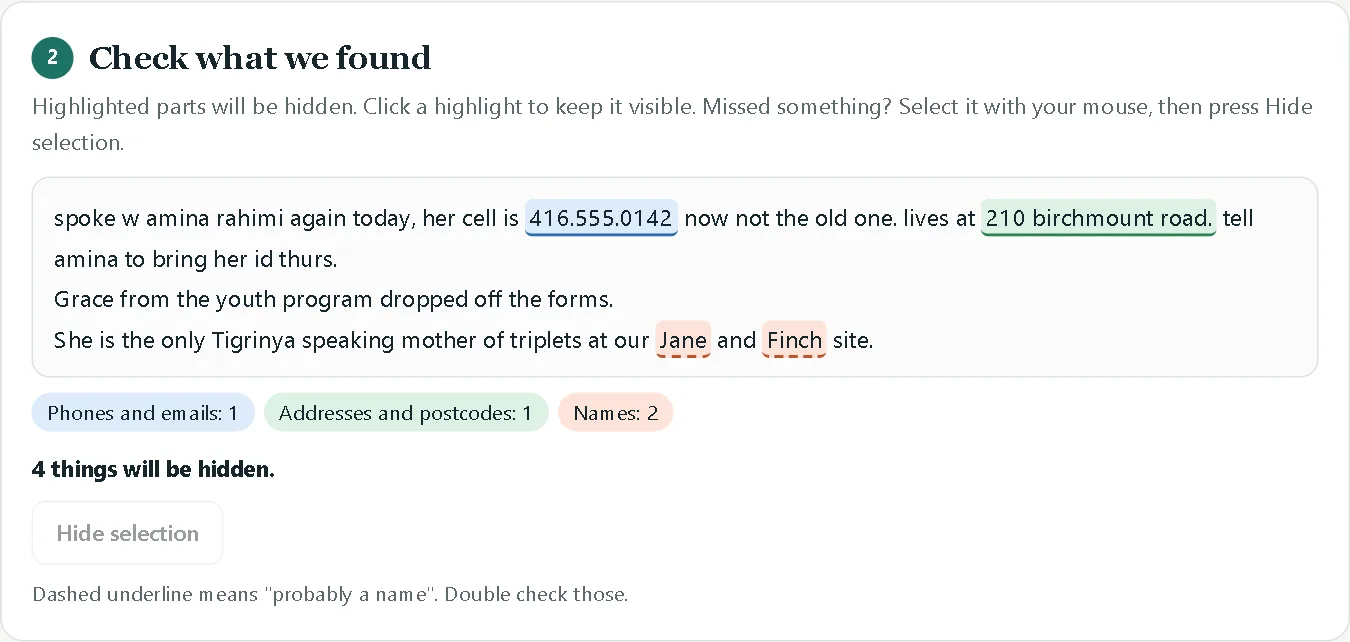
3. Descriptions that identify someone without a name (0 of 40). This is the dangerous one. Here's one of our test notes, run through the live tool with default settings:
And the same note after typing "Amina Rahimi" into "Always hide":
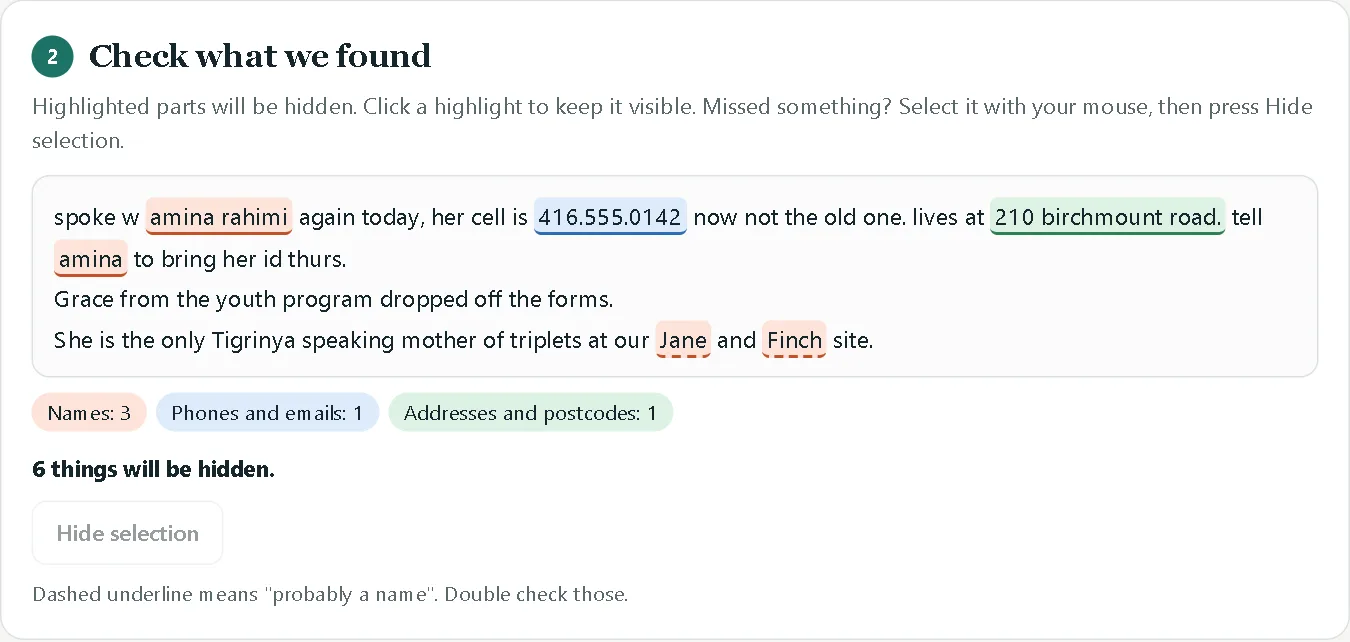
Look at the last line. The tool hid "Jane" and "Finch" because they look like names, but "the only Tigrinya speaking mother of triplets at our Jane and Finch site" still points to exactly one person in that community. No pattern matching will ever catch that, because there's nothing in the sentence to match. Only a person who knows the community will.
What this means for your team
- Use a tool, then read the result. Automatic hiding gets you most of the way, and reading the safe version takes 20 seconds. Neither is enough on its own.
- Type the client's name into "Always hide" first. It's one step, and in this study it took fully clean notes from 45% to 66%.
- Watch for three things when you read: names at the start of a sentence, names that are also words, and any description that only fits one person.
- For daily use with sensitive information, don't send it out at all. A private AI that runs on a server you control removes the need to hide anything. That's what we build.
For the bigger picture on what ChatGPT does with what you type, read is it safe to put client information into ChatGPT?
Limits of this study
- The notes are made up. We wrote them to cover the patterns that show up in real case notes, but real notes are messier. Treat these numbers as a best case for the detail types we tested, not a guarantee.
- We tested our own tool. That's a conflict of interest, which is why we're publishing everything: the 200 notes, every detection and the scoring code are all on GitHub, so anyone can rerun it or test another tool on the same set.
- False alarms were zero here, but our test notes don't include many capitalized words that aren't names. In real notes, expect the tool to sometimes hide a place or organization name. That's a safe failure: it hides too much, not too little.
Try it, or check our work
- Use Safe Paste free. Nothing you paste leaves your browser.
- Get the test set and scoring code and run it yourself:
python research/make_notes.py,node research/run.mjs v1.1,python research/analyze.py v1.1. - Found a pattern it misses? Tell us on GitHub or on LinkedIn, and it goes into the next version and the next run of this study.