AI and client privacy
Is it safe to put client information into ChatGPT?
 By Zehaan Khan · Updated October 16, 2026
Short answer: not on a free or personal ChatGPT account. If a case note, referral or email has anything that could identify a client, take those details out first, or use a tool your organization has a proper agreement for. Below is why, and four safe ways to keep using AI for client work.
Staff at nonprofits use ChatGPT for the same reason everyone does: it saves time. A messy case note gets cleaned up in seconds. A referral letter writes itself. The problem isn't the time saved. It's what gets pasted in to save it.
What happens to what you type
It depends on the kind of account.
| Account | Used to train OpenAI's models? | Where it stays |
|---|---|---|
| Free, Plus or Pro (personal) | Yes, by default, unless you turn off "Improve the model for everyone" | In your chat history until you delete it |
| Temporary Chat (any personal account) | No | OpenAI may keep a copy for up to 30 days for safety |
| ChatGPT Business, Enterprise or Edu | No, by default | Kept according to your organization's workspace settings |
On a personal account, the training setting is on unless someone turns it off. In ChatGPT that's under Settings, then Data controls, then "Improve the model for everyone" (OpenAI's data controls page). Most staff have never opened that menu.
Turning training off helps, but it doesn't make the information private. The text still leaves your organization, it's processed by OpenAI, a US company you probably have no agreement with, and it sits in that person's chat history until they delete it. Temporary Chat isn't used for training, but OpenAI can still keep a copy for up to 30 days.
Business accounts are a different story: OpenAI says it doesn't train on ChatGPT Business, Enterprise or Edu data by default (OpenAI Academy: data governance). That's a real difference, and we'll come back to it.
Why this matters more for nonprofits
You hold the most sensitive information there is. Immigration status, diagnoses, addiction history, the address of someone leaving an unsafe home, a child's school situation. A leak isn't embarrassing. It can put someone in danger.
Your organization stays responsible. When a staff member pastes a case note into a personal ChatGPT account with good intentions, the organization is still accountable for that information. Depending on your province and the work you do, that can mean PIPEDA, a provincial privacy law like BC's or Alberta's PIPA, a health privacy law like Ontario's PHIPA, and the privacy terms in your funding agreements. Even where no law applies directly, your clients' trust does.
Regulators are paying attention. On May 6, 2026, Canada's federal Privacy Commissioner, Quebec's privacy regulator and the BC and Alberta commissioners released joint findings on how OpenAI trained the models behind ChatGPT. They found OpenAI lacked valid consent, including for training on people's conversations with ChatGPT. The federal office found the complaint well founded and conditionally resolved; BC and Alberta found it well founded but unresolved (PIPEDA Findings #2026-002). Those findings were about OpenAI, not about your staff. But they show where Canadian regulators stand on personal information going into AI.
Client information is more than names
Most people think "personal information" means a name. It's much wider than that:
- Direct identifiers: names, phone numbers, emails, home addresses, dates of birth, SIN, health card numbers, client or file numbers.
- Indirect identifiers: details that point to one person even without a name.
Here's an example from our own testing. This sentence has no name, no number and no address in it:
"The client is the only Tigrinya speaking mother of triplets at our Jane and Finch site."
Anyone in that community knows exactly who that is. No automatic tool will catch a sentence like that, because there's nothing in it to pattern match. That's why the most important step is always a human reading the text before it goes anywhere.
Four safe ways to use AI with client work
1. Take the identifying details out first (free)
The simplest fix is to make sure the AI never sees who the client is. That's why we built Safe Paste, a free tool that hides client details before they reach ChatGPT.
Here's the whole thing in under two minutes, or read the steps below:
You paste a case note. It finds names, phone numbers, emails, health card numbers, SIN, dates and addresses, and swaps them for placeholders like [NAME_1] and [PHONE_1]:
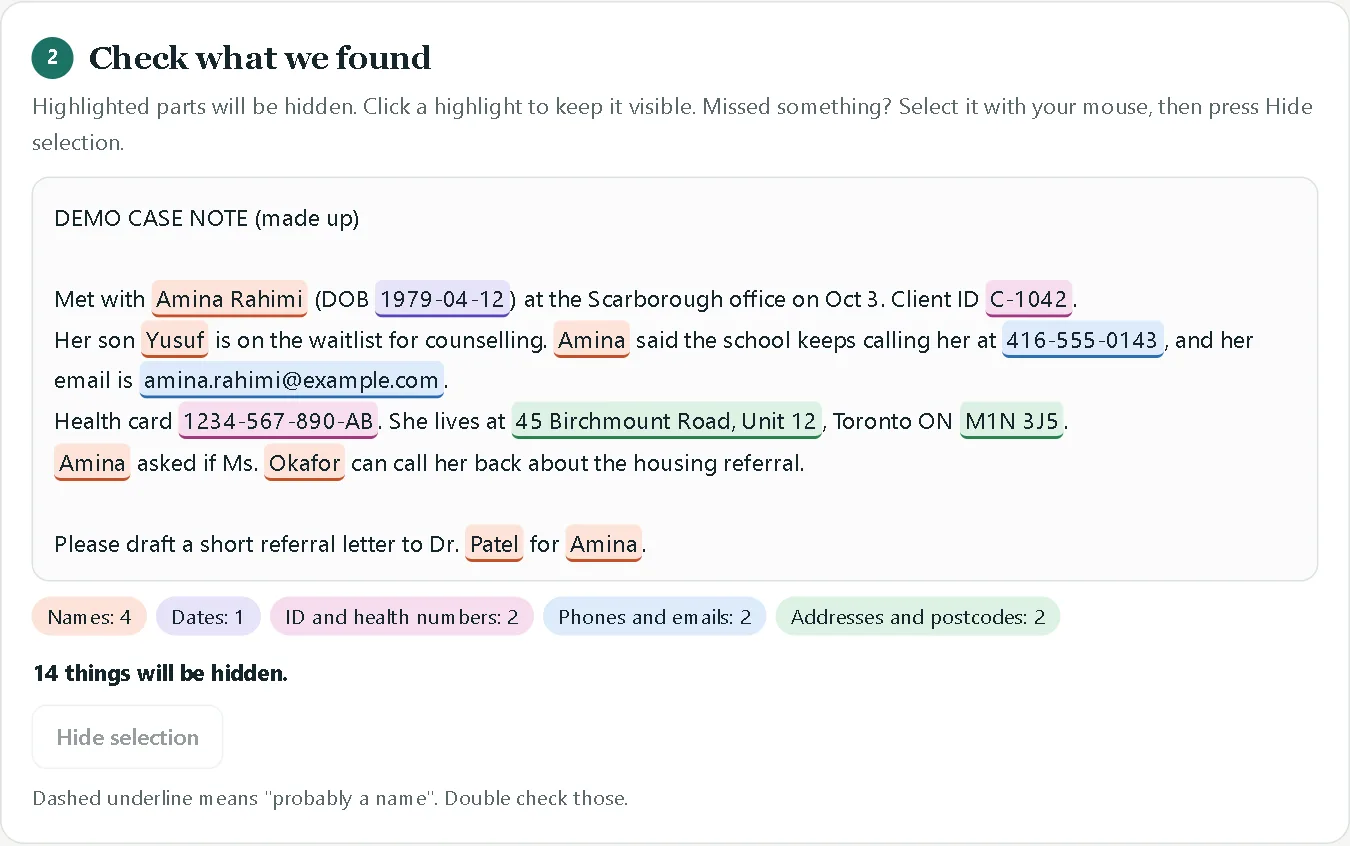
You write your prompt the way you normally would, and Safe Paste adds a few rules at the end so ChatGPT keeps the placeholders intact:

When the answer comes back, you paste it into Safe Paste and the real names go back in. If ChatGPT needed something that wasn't there, it writes [MISSING] instead of making something up:
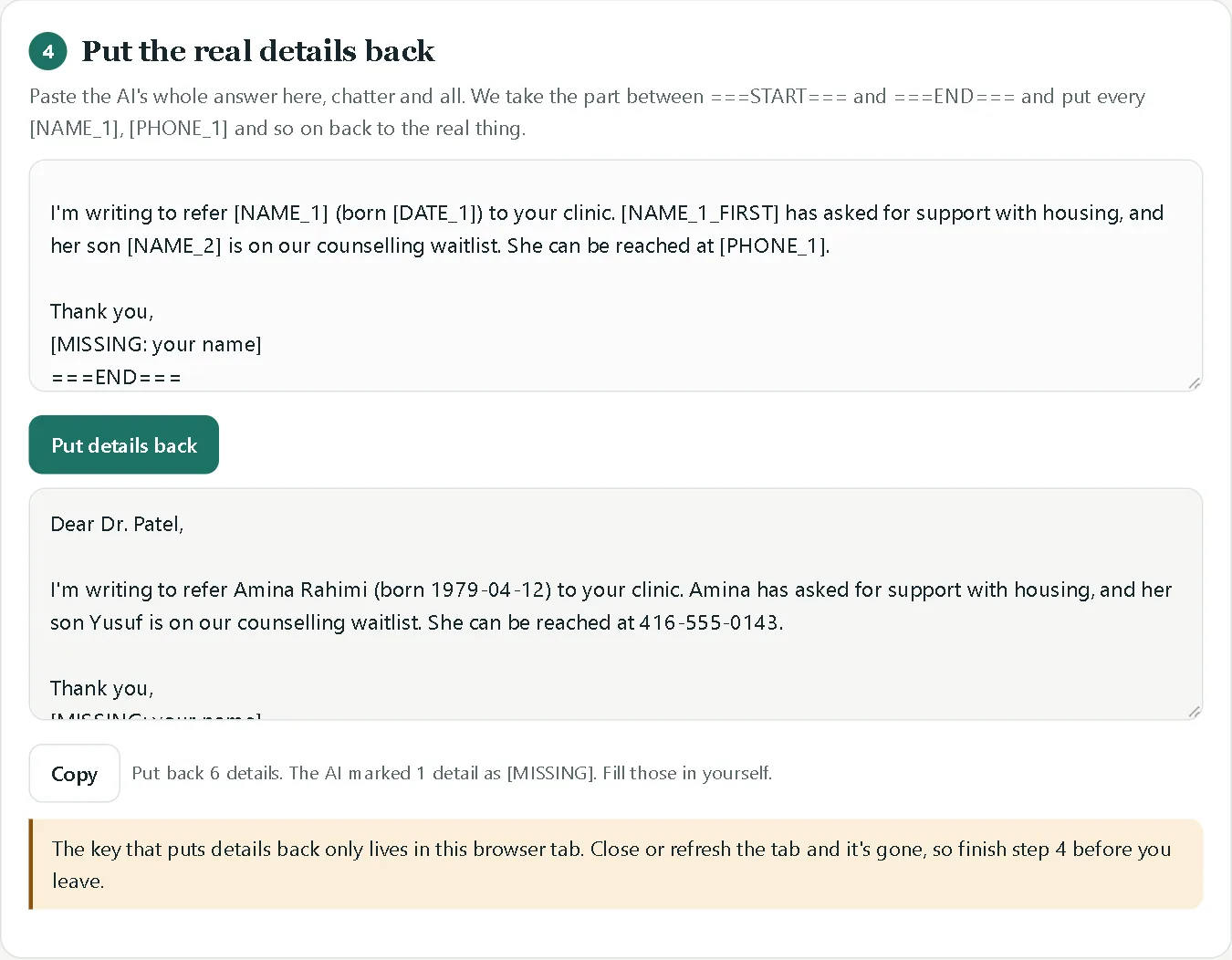
Safe Paste runs entirely in your browser. Nothing you paste is sent anywhere, and you can check that yourself: turn off your wifi and it still works. It catches common patterns, not everything, so you still read the safe version before you paste it. The Jane and Finch example above is exactly the kind of thing only a person will catch. We measured this: in our test of 200 made up case notes, Safe Paste hid 89.4% of personal details automatically and 95.3% when staff added the client's name, and caught none of the identifying descriptions.
Try it now, free: Safe Paste hides client details before they go into ChatGPT. No sign up, nothing to install.
2. Use a business account your organization controls
If your team uses AI every day, a business plan like ChatGPT Business or Enterprise is a real step up: OpenAI doesn't train on that data by default, and your organization controls the accounts instead of each person using their own. Other big AI companies offer similar business versions.
Two things to check before you rely on it. First, the information still goes to a company outside your organization, usually in the United States. If a funder agreement says client data has to stay in Canada, a business plan may not be enough. Second, read the agreement itself, not the marketing page.
3. Run a private AI on your own server
This is what we build. Instead of sending client information to a public AI company, the AI model runs on a server your organization controls. It answers questions from your own files, spreadsheets and scanned forms, a volunteer can't see what a caseworker can, nothing changes without a person approving it, and every action is logged. See how the private assistant works.
It's the right fit when you handle sensitive information every day and want the speed of AI without the information leaving your control.
4. Put it in writing
Whatever you choose, staff need to know the rules. A short AI use policy covers it. Build yours free with our AI policy template, matched to your province's privacy laws, or start from these four rules:
- Fine to use AI for: public information, newsletters, job posts, templates, brainstorming, and text with no personal details in it.
- Never put into a public AI tool: client names, contact details, ID or health card numbers, case notes, diagnoses, immigration information, or anything shared in confidence.
- Ask first: any new AI tool, browser extension or meeting note taker.
- Always: a person checks what the AI wrote before it goes to a client, funder or the public.
A 30 second check before you paste
Before anything goes into an AI tool, ask:
- Is there a name, phone number, email, address or birth date in it?
- Is there an ID number: SIN, health card, client or file number?
- Could someone who knows the community figure out who this is anyway?
- Am I on a personal account or one my organization controls?
- Would I be comfortable if the client read exactly what I'm about to paste?
If any answer worries you, take the details out first.
Questions people ask
If I turn off "Improve the model for everyone", is it safe? It's better, but it isn't private. The information still leaves your organization and stays in the chat history until it's deleted.
What about Temporary Chat? It isn't used for training, but OpenAI may keep a copy for up to 30 days. It's a good habit, not a privacy guarantee.
Is ChatGPT allowed under Canadian privacy law? There's no simple yes or no. What matters is how your organization uses it: what goes in, what account it's on, what your clients agreed to, and what your funders require.
Can we still use ChatGPT at all? Yes. Use it freely for anything without personal information in it, and take the details out first when there is. Most of the time savings survive that step.
This guide is general information, not legal advice. If your organization handles health information or works under specific funding agreements, check those requirements directly.
Sources: OpenAI: data controls in ChatGPT · OpenAI: Temporary Chat · OpenAI Academy: data governance and compliance · Office of the Privacy Commissioner of Canada: PIPEDA Findings #2026-002